True Launch Bar 5.6
Updated on 31 Jan 2012
By Anthony Buckner
By Anthony Buckner
Specifications
License:
Shareware
Updated:
Downloads:
2542
Platform:
Win98,WinME,WinNT 4.x,WinXP,Windows2000,Windows2003,Windows Tablet PC Edition 2005,Windows Media Center Edition 2005,Windows Vista Starter,Windows Vista Home Basic,Windows Vista Home Premium,Windows Vista Business,Windows Vista Enterprise,Windows Vista Ul
Publisher:
Tordex(more)
Website:
User Reviews:
Other versions:
4.4, 4.3, 4.2.3 Beta
Do you like
True Launch Bar?
True Launch Bar?
FindMySoft Editor's Review
True Launch Bar – Alternative to the Quick Launch Bar
No matter what the people at Microsoft do, we'll never be satisfied with how Windows looks and feels. Developed by Tordex, True Launch Bar provides all the functionality you’ve come to expect from the Quick Launch Bar. This program lets you create and customize your own menus on the task bar.
If you want to try it out, you can download the roughly 13 Mb package free of charge. The trial period lasts 30 days and, during this time, you'll see a demo reminder next to the Start button. Installing the software is straight forward with no system restart required and no bugging you to register.
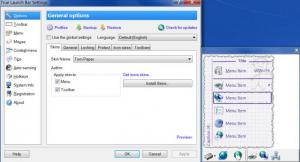
Once the program is installed, you need to right click the task bar, go to Toolbars and click True Launch Bar. The only interface to this program is its settings panel. You can find an impressive number of changes to be made here for the skin, menus, toolbar, buttons, colors and a lot more. You won't have any trouble finding what you're looking for. Everything is organized by categories, accessible via buttons on the left side of the window.
The number of options True Launch Bar can offer will make your task bar more flexible than ever. Just right click the task bar, go to New and click what you need. Under the "New" menu you'll find a long list of predefined shortcuts and menus. From a simple Shut Down button to menus with their own sub-menus where you can place whatever you need by clicking and dragging, True Launch Bar has it all. You can even create a new menu, shortcut or a separator so that you won't mix up the icons. When you create a new menu, a wizard will show up and take you through two or three steps so that you can choose if the icons should be large or small, should they be accompanied by text and so on. This makes it possible to customize your task bar however you want, in ways you can't do with the standard Windows features. If you can't be bothered with navigating your folders, you can just create menus and sub-menus where you can group anything.
Pros:
The program lets you customize the standard task bar to be a lot more flexible and useful. Besides placing shortcuts and separators on it, you can create your own menus and group your applications. This makes standard folder navigation obsolete. Another good thing is that True Launch Bar is not expensive at all.
Cons:
Aside from a trial period of just 30 days, there's nothing wrong with this software.
No matter what you need to launch or access in your computer, True Launch Bar lets you do it all from the task bar quickly and easily.
If you want to try it out, you can download the roughly 13 Mb package free of charge. The trial period lasts 30 days and, during this time, you'll see a demo reminder next to the Start button. Installing the software is straight forward with no system restart required and no bugging you to register.
Once the program is installed, you need to right click the task bar, go to Toolbars and click True Launch Bar. The only interface to this program is its settings panel. You can find an impressive number of changes to be made here for the skin, menus, toolbar, buttons, colors and a lot more. You won't have any trouble finding what you're looking for. Everything is organized by categories, accessible via buttons on the left side of the window.
The number of options True Launch Bar can offer will make your task bar more flexible than ever. Just right click the task bar, go to New and click what you need. Under the "New" menu you'll find a long list of predefined shortcuts and menus. From a simple Shut Down button to menus with their own sub-menus where you can place whatever you need by clicking and dragging, True Launch Bar has it all. You can even create a new menu, shortcut or a separator so that you won't mix up the icons. When you create a new menu, a wizard will show up and take you through two or three steps so that you can choose if the icons should be large or small, should they be accompanied by text and so on. This makes it possible to customize your task bar however you want, in ways you can't do with the standard Windows features. If you can't be bothered with navigating your folders, you can just create menus and sub-menus where you can group anything.
Pros:
The program lets you customize the standard task bar to be a lot more flexible and useful. Besides placing shortcuts and separators on it, you can create your own menus and group your applications. This makes standard folder navigation obsolete. Another good thing is that True Launch Bar is not expensive at all.
Cons:
Aside from a trial period of just 30 days, there's nothing wrong with this software.
No matter what you need to launch or access in your computer, True Launch Bar lets you do it all from the task bar quickly and easily.
Do you like True Launch Bar
Quick Look VideoNew
Popular News
The “Who Touched my Phone” app will show you who snooped on your iPhone while you were away.
The Suspend Background Tabs add-on will prevent background tabs from running periodical actions, thus improving the browser’s performance and preventing unnecessary CPU load.
True Launch Bar Awards
True Launch Bar Editor's Review Rating
True Launch Bar has been reviewed by Frederick Barton on
31 Jan 2012. Based on the user interface, features and complexity, Findmysoft has rated
True Launch Bar
4
out of 5 stars, naming it ExcellentYour Rating
Top Downloads
2.
Opera5.
Trillian8.
AIM9.
Skype10.
Ad-Aware12.
Nero13.
Google Earth14.
Picasa15.
Winamp16.
iTunes17.
RealPlayer18.
uTorrent19.
eMule20.
WinRAR21.
BitComet22.
WinZip23.
Shareaza24.
CCleaner25.
Recuva26.
Tweak UI27.
CuteFTP Home29.
Adobe Reader30.
NewsPiperBecome A Fan!
Link To Us!
True Launch Bar
HTML Linking Code
HTML Linking Code
Latest Reviews